Appearance
商品和订单对接
系统支持传递对话上下文,用于携带本次会话相关的任意业务信息,不仅限于商品和订单。本页以“正在咨询的商品”和“相关订单”为例,说明如何使用对话上下文,让客服在接待时快速了解访客的咨询背景。
对话上下文通过 contexts 传递,一次接入可以同时传递多个上下文。除了商品和订单,也可以传递售后单、活动信息、网页内容或其他业务对象。
上下文格式
| 字段 | 说明 |
|---|---|
key | 上下文唯一标识,例如 product:10001 或 order:202607230001。 |
type | 上下文分类标识。系统不限制固定枚举,product、order 是商品和订单场景的推荐值,也可以按业务定义其他值。 |
title | 在客服端显示的上下文名称。 |
url | 商品或订单详情页地址。 |
fields | 需要展示的业务字段,每个字段包含 key、label 和 value。 |
fields 字段说明
fields 用于描述上下文中需要展示的具体业务信息。每个字段至少包含以下内容:
| 字段 | 说明 |
|---|---|
key | 字段唯一标识,由接入方定义。 |
label | 字段在客服端显示的名称。 |
value | 字段值,可以是文本、金额或图片地址等。 |
type | 可选的展示类型。未填写时按普通文本展示;填写 image 时按图片预览展示,填写 url 时按链接展示。 |
image 字段的 value 应填写图片 URL,url 字段的 value 应填写可访问的链接地址。其他类型(例如示例中的 money)可用于标识业务含义,未触发专用展示时按文本显示。
完整接入示例
将下面完整内容保存为 product-order-test.html,用浏览器打开后点击右下角咨询入口,即可测试商品和订单信息传递:
html
<!doctype html>
<html lang="zh-CN">
<head>
  <meta charset="UTF-8">
  <meta name="viewport" content="width=device-width, initial-scale=1.0">
  <title>商品和订单对接测试</title>
</head>
<body>
  <script src="https://live.99kf.com/static/js/kf.js"></script>
  <script>
    window.kfVisitor = KFVisitor.init({
      baseUrl: 'https://live.99kf.com',
      businessId: 'afxGIDLM',
      groupId: 0,
      displayMode: 'floating',
      autoOpenDelay: 1,
      visitor: {
        avatar: 'https://www.99kf.com/avatar/12.jpg'
      },
      contexts: [
        {
          key: 'product:smartwatch',
          type: 'product',
          title: '正在咨询的商品',
          url: 'https://www.99kf.com/img/preview/smartwatch-demo.webp',
          fields: [
            { key: 'item_name', label: '商品名称', value: '智能运动手表 GPS 蜂窝版' },
            { key: 'cover', label: '商品封面', type: 'image', value: 'https://www.99kf.com/img/preview/smartwatch-demo.webp' },
            { key: 'retail_price', label: '零售价', type: 'money', value: '¥3,299.00' },
            { key: 'case_size', label: '表壳尺寸', value: '46mm 铝金属表壳' },
            { key: 'band', label: '表带', value: '深蓝色运动型表带' },
            { key: 'member_benefit', label: '会员权益', value: '赠 12 个月意外保障' }
          ]
        },
        {
          key: 'order:DEMO-AUDIO-260714',
          type: 'order',
          title: '最近订单',
          url: 'https://www.99kf.com/img/preview/wireless-headphones-demo.webp',
          fields: [
            { key: 'trade_no', label: '交易单号', value: 'DEMO-AUDIO-260714' },
            { key: 'after_sale', label: '售后状态', value: '支持 7 天无理由退货' },
            { key: 'product_name', label: '商品名称', value: '降噪无线头戴耳机 午夜蓝' },
            { key: 'item_image', label: '订单商品图', type: 'image', value: 'https://www.99kf.com/img/preview/wireless-headphones-demo.webp' },
            { key: 'invoice_type', label: '发票类型', value: '电子普通发票' },
            { key: 'amount', label: '支付金额', type: 'money', value: '¥1,899.00' }
          ]
        }
      ]
    });
  </script>
</body>
</html>
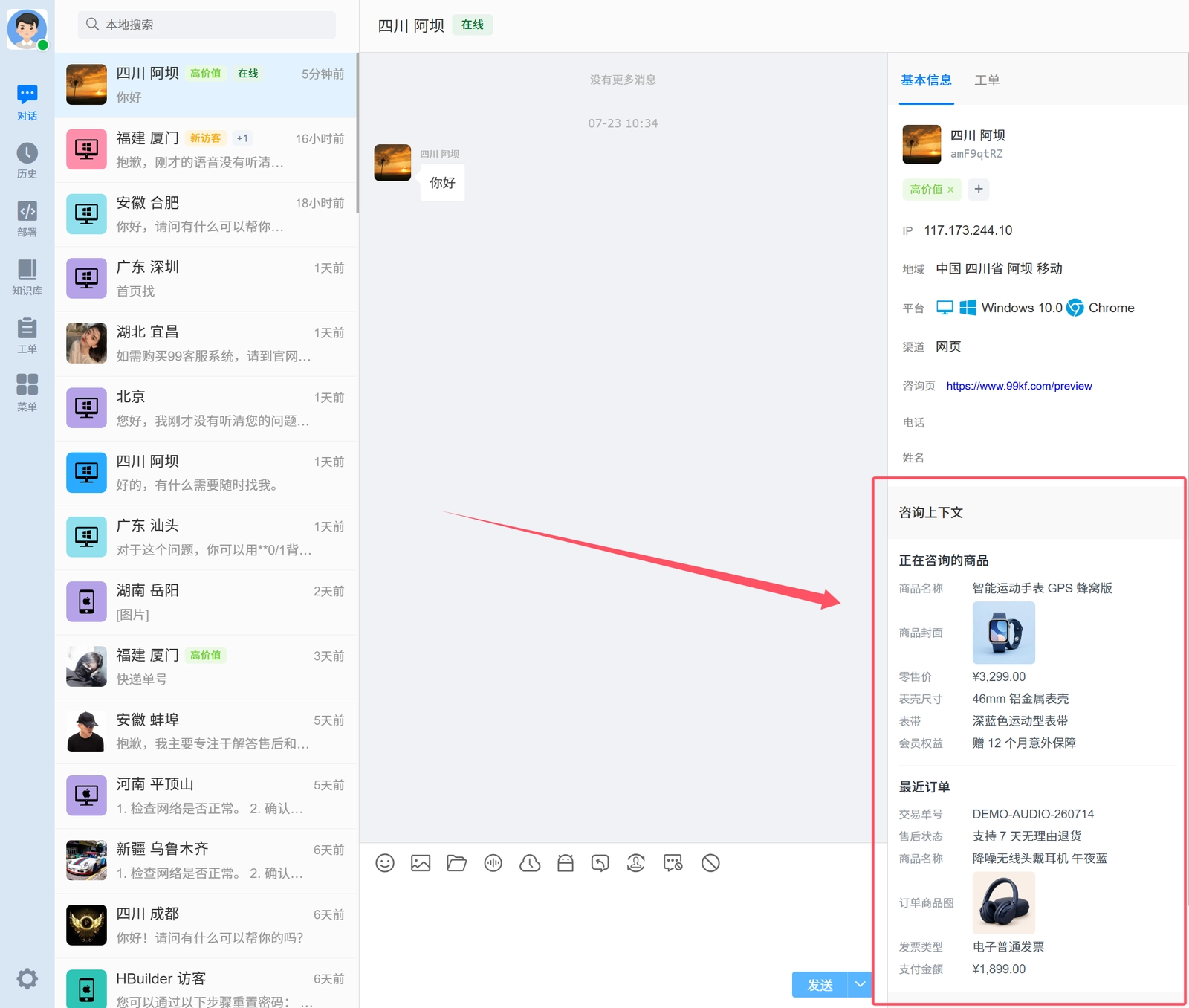
客服打开该访客会话后,可以在访客上下文区域查看商品和订单信息,并通过链接进入对应详情页。
最终效果
客服在访客会话的“咨询上下文”区域,可以同时查看正在咨询的商品和最近订单。图片字段会显示为缩略图,订单、价格、售后状态等字段会按配置的标签和值展示。